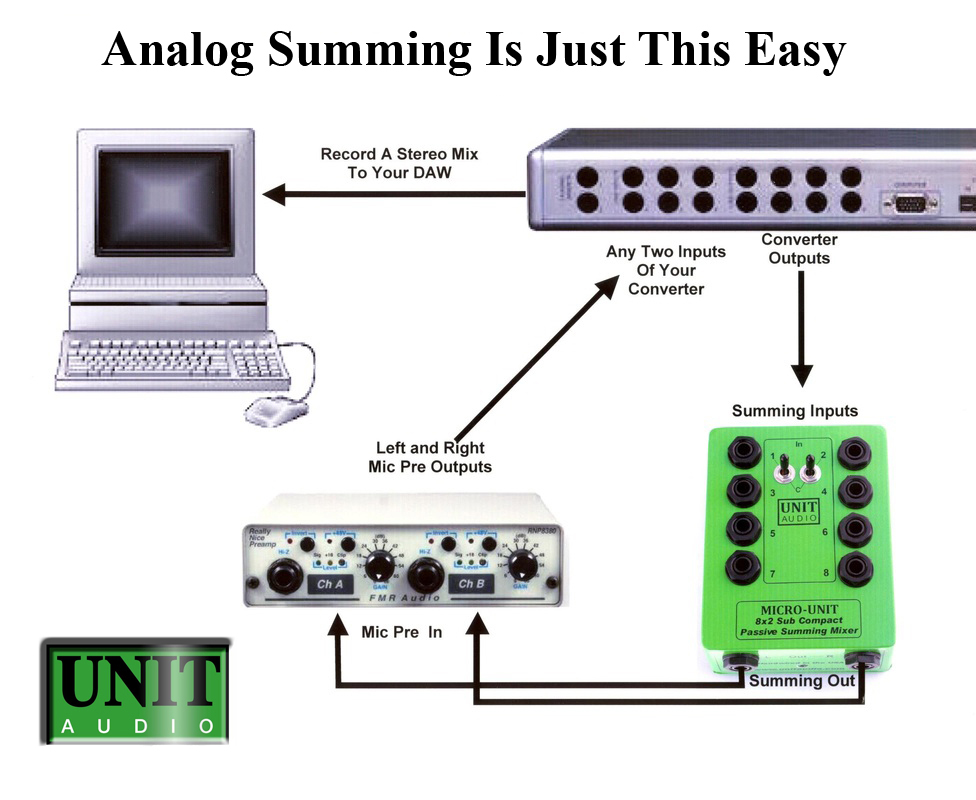
Basic DAW analog summing set up.
Set Up Steps
1. Mix your tracks as though you were going to do your final stereo mix in the computer. Add your plugins and effects, do your pans and any automation. 2. Create 4 stereo output stems (Milli-Unit or Micro-Unit) or 8 stereo output stems (NewUnit). 3. Set up hardware as shown in the diagram at the top of this page. 4. Route your recorded tracks to the 4 or 8 stems you have created, i.e. your drum tracks may be routed to stem 1 which in turn could go to outputs 1 and 2 of your interface and then to input 1and 2 of the Milli, Micro,or New Unit. 5. Once your have completed your routing from the software to the hardware you are ready for the mix. 6. Add a stereo track to your song. 7. Come out of the Milli, Micro, or New Unit balanced low impedance Microphone outputs into two channels of any mic preamp, out of the preamp and into two channels of your interface. Then simply record a stereo mix. NOTE: Make sure the phantom power is turned OFF on the two Mic Preamp input channels you are using. You do not need phantom power. 8. That's it! NOTE: All odd channels of the Mill, Micro,and New Unit summing boxes default left on the stereo buss. All even channels default right. This is why you need to have the stereo output stems in your software mix, where your pans will be done. The Micro-Unit and New Unit models come with pan switches on channels 1 and 2. This allows you to put a single instrument or vocal on channels 1 and 2 by simply putting the toggle switch in the C (center) position. 
Balanced 1/4” TRS output to XLR input wiring diagram
|
Priced at only $149.00*
The Milli-Unit is our entry level mixer with all the basic features you need to add that analog sparkle and punch to your ITB recordings ....more *plus shipping. 
The Micro-Unit is our upgraded 8 input mixer that shares all the basic features of the Milli-Unit, plus 2 pan switches for additional mix flexibility. ...more
|

Unit Audio makes high quality affordable analog summing mixers and acoustic control for pro recording and project studios.